
⭐️ ORDER TO SHOWROOM DE + NO
Uppdaterad
ROUTINE ORDER + ORDERING & RECEIVING PRODUCTS DE + NO SHOWROOM:
🚚 When you want to order a product to your showroom:
Place a TRA-order
- Open Transfer order in BC
- Create a new one
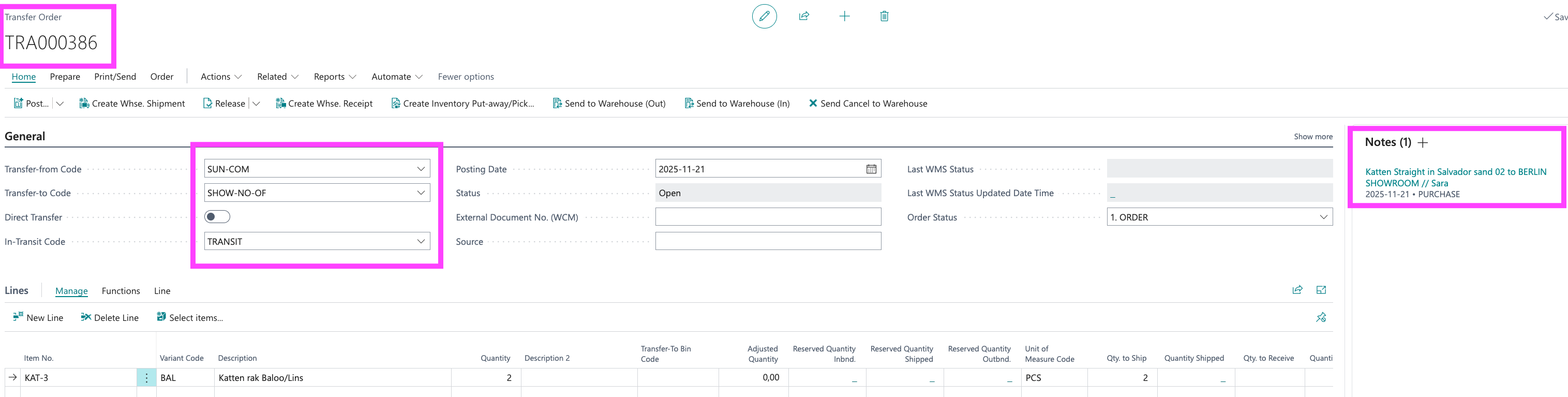
- Transfer-from Code: SUN-COM
- Transfer-to SHOW-DE/NO-OF/ON depending on if the product is to stay in showroom or be sold to customer ex Furniture kits
- Choose Transfer-code:TRANSIT
- Enter the products
- Leave a clear comment what it is and who made the order
- Tag the order: ORDER
- Slack the TRA-ordernumber in operations-germany / operations-norway (TRA000386 ⬇)
- OPS will order the products
- When we get an OC, OPS/Emilia will ad it as a comment in the Transfer order.
- When the products arrive at Future OPS will let you know.
- OPS will release the order for delivery
📦 When you receive the order to your showroom:
- Double check that everything on the TRA-order is received - Contact OPS if something is missing
- Let OPS know the products have arrived in slack operations-norway / operations-germany
- OPS post the TRA-order
🔩 When you want to order spare parts to showroom:
Place a TRA-order
- Open Transfer order in BC
- Create a new one
- Transfer-from Code: SUN-COM
- Transfer-to SHOW-DE/NO-OF
- Choose Transfer-code:TRANSIT
- Enter the products: EX. Article TRDEL
- Leave a clear comment what it is and who made the order
- Tag the order: ORDER
- Slack the TRA-ordernumber in operations-germany / operations-norway (TRA000386 ⬇)
- OPS will order the products
- When we get an OC, OPS/Emilia will ad it as a comment in the Transfer order.
- When the products arrive at Future OPS will let you know.
- OPS will release the order for delivery