ONGOING - GOODS IN STOCK
Uppdaterad
The SUN-COM stock location in BC is the only stock connected to Ongoing.
- When an order is released to Future, all products must have the location code SUN-COM in order to appear in Ongoing.
- If you want to release an order that contains a product stored in FT-offline, you need to release it with the warehouse SUN-COM and then switch to FT-offline in BC so that the product will be deducted from the correct BC warehouse when posting.
- Products that have been scanned at Future can be found under Goods in stock (both those located in location SUN-COM and FT-offline) ⚠️ Stock products in broken packaging cannot be found under Goods in stock.
GOODS IN STOCK:
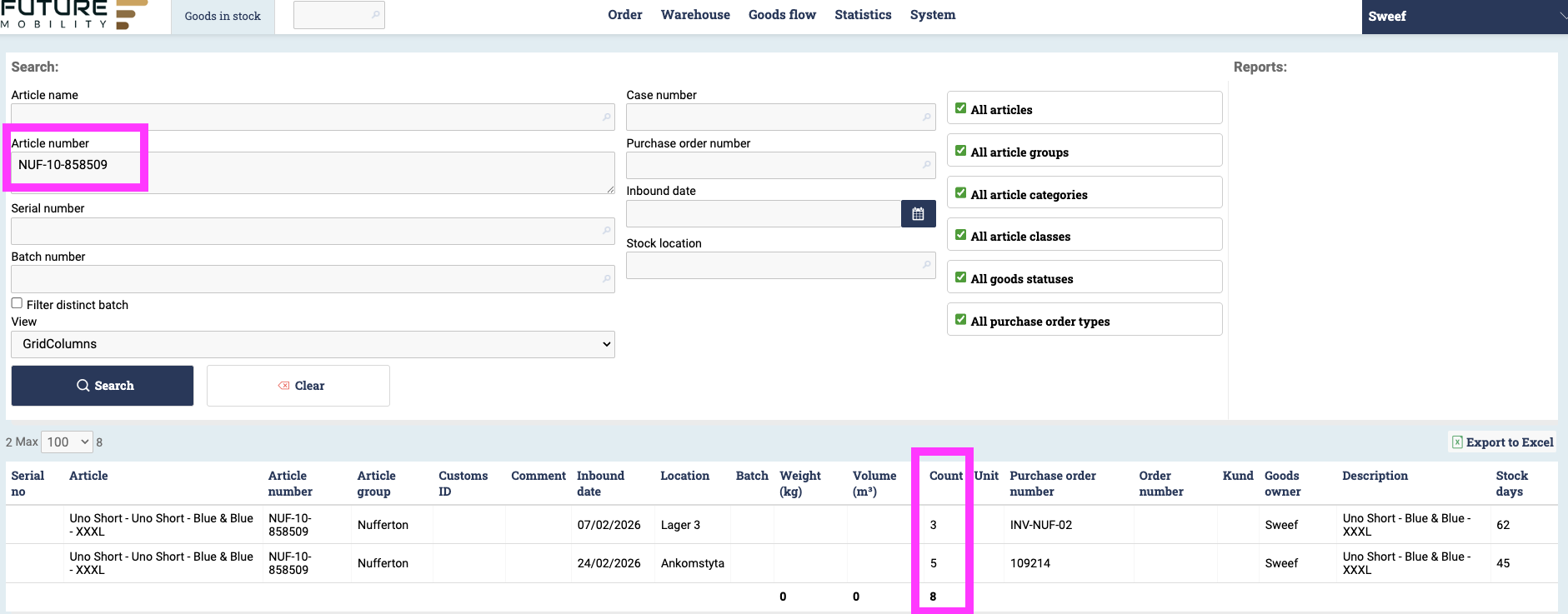
Scenario: Check if an item is in stock. View scanned status / storage location at Future.
Hover over Goods Flow
Click on Goods in Stock
Search by article number or batch number (order number)
⭐️ Combine article + variant code = NUF-10-858509
⭐️ Searching for a Jaguaren table JAG-100X35-TR-TR needs to be divided into TOP and LEG:
- JAG-100X35-LEGS-TR
- JAG-100X35-TOP-TR