
⭐️ CLAIMS ROUTINE ENG
CLAIMS SCENARIOS:
1️⃣ ORDER A COMPLETE FUNITURE
1. Create a NEW order in the customer card in BC
2. Item number: the product’s item number, e.g. BJO-3 + Variant code
- NOTE: Add fabric row if it’s a Burhens furniture
3. Stock: SUN-COM
4. Add shipping / assembly / removal as item lines
5. Description: PRIO
6. Notes:
- CLAIM #12345 (original order number)
Reason for the claim
Paste Kundo link + Claimlane no.
Initials
7. If the original product shall be returned upon delivery of the CLAIM-product: Create a +/- order row
- Add the product with a negative quantity in the order.
- Product + fabric to the stock it should return to (ex Offline stock if it is to be sold second hand)
- Add: Return row
- Add a compensation row if there is a difference in the cost between the products (minus)
- Total amount should be zero!
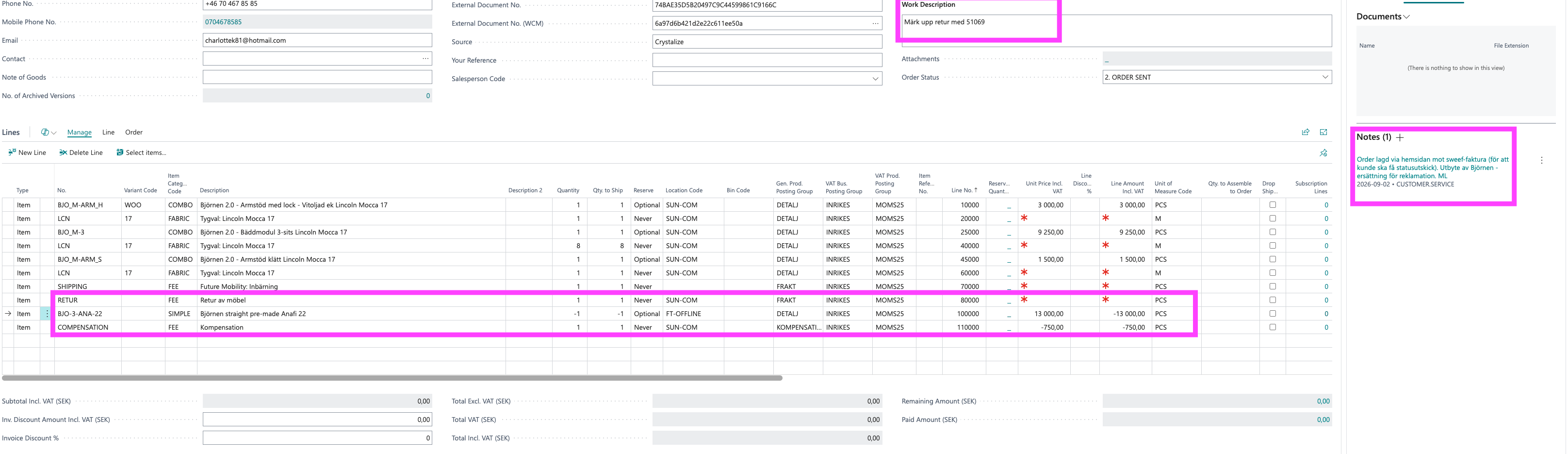
- Add any incoming/return product to Special Items in stock INCOMING with information about condition + whether anything should be credited when the product arrives + initials + whether it is a +/- order
8. No product is to be returned:
- Adjust the price on row to 40% on Furniture and 50% on Nufferton + HFC.
- Add a compensation row on remaining amount (minus)
- Total amount should be zero!

9. In stock: Release the order to ongoing
10. If the product should be ordered: Tag ORDER
2️⃣ ORDER SPARE PART (that is not in stock in showroom Stockholm):
1. Create a NEW order in the customer card in BC
2. Item number: CLAIM (or other existing Item article... coming soon)
3. Variant code: BURHENS / BEFAME / BRW
4. Stock: SUN-COM
5. Work description: Desired spare part (e.g. sofa legs – specify quantity)
6. Add shipping / assembly / removal as item lines with correct description (ex. Shipping: UPS: Heimzustellung)
7. Note:
- CLAIM #12345 (original order number)
Reason for the claim
Paste Kundo link / Claimlane no.
Initials
8. Tag: ORDER CLAIM
3️⃣ SEND OUT EXISTING FURNITURE / SPARE PART - From Future, ex. Björnen lid:
1. Create a NEW order in the customer card in BC
2. Item number: CLAIM_STOCK
3. Variant code: WOODENTOP
4. Stock: SUN-COM
5. Add shipping / assembly / removal as item line (ex. Shipping: UPS: Heimzustellung)
6. Work description: Björnen lid in stock
7. Note:
- CLAIM #12345 (original order number)
Reason for the claim
Paste Kundo link / Claimlane no.
Initials
8. RELEASE to Ongoing (Send to warehouse + Release)
9. Double check order in Ongoing that it does not say RESTAD - if it does - contact OPS
9. Tag: RELEASED
NOTE! – Always double-check stock if anything is sent from shared inventory as a spare part. Check with OPS if unsure.
NOTE! – Initials are important for easy tracking of the case.
4️⃣ SPARE PARTS from Stockholm Showroom to DE/NO customer:
1. Create a NEW order in the customer card in BC
2. Item number: TRDEL
3. Description: ex 5 Björnen plastic feet
4. Stock: SHOW-SE-OF
5. Add shipping / assembly / removal as item line (ex Shipping: UPS: Heimzustellung)
6. Work description: ex 5 Björnen plastic feet
7. Note:
- CLAIM #12345 (original order number)
Reason for the claim
Paste Kundo link / Claimlane no.
Initials
8. Tag: PENDING
- KS Stockholm will handle this order.
- If it is urgent: Slack the request in operations-customerservice ex: KS Stockholm, urgent pending request: BC12345 🙏