
FRAKTUS
FRAKTUS
1. HOW TO SHIP TO CUSTOMER
2. HOW TO CREATE RETURN LABEL
Link: https://service.apport.net/login/#/nosession
Username: Sweef
Company ID: Booking
Password: ludvig!123
1️⃣ HOW TO SHIP TO CUSTOMER
Select MY SHIPMENTS ➡️ Register Shipment
1.Template Information
Select the appropriate template. See more shipment templates below ⬇️
- Shipping within the EU → UPS Standard Europe (export):
- Shipping outside the EU (e.g. Norway) → UPS Express Saver Export (requires commercial invoice):
2. References
Shippers reference: e.g. HFC123 (order number)
Consignees reference: e.g. HFC123 (order number)
3. Addresses (logged in adressbook)
Sender / Consignor: SWEEF AB, Wallingatan 10. ⮑ If it is a return: Customer
Receiver / Consignee : Customer. ⮑ If it is a return; SWEEF AB, Wallingatan 10 or Future Mobility
4. Goods rows
Quantity: Number of packages
Package type: Package UPS 02 (10 kg or 25 kg)
Weight, length, width, and height (volume and loading meters not required) See parcel dimensions below ⬇️
Goods marking: #12345 (order number)
Type of goods: e.g. Svalan legs - SWEEF
5. Customs data
Leave empty if a customs/commercial invoice is not required.
Customs invoice for countries outside the EU: See customs/commercial invoice below ⬇️
6. Transport product
When selecting DHL Service Point (B2C): choose service point manually if the customer requests it
7. Freight payer: Sender
8. Attachment: Upload customs/commercial invoice if needed
9. Other
Pickup date, time 10–17
10. Book and print
11. Paste the shipment number into the BC order or customer email
12. Print
Shipping document (printed on Fraktsson at ÖL)
Receipt list (printed on SHARP)
13. Attach label to parcel + any customs invoice. Attach the receipt lists lightly to the package. These are signed at pickup.
2️⃣ HOW TO CREATE RETURN LABEL (return to Future)
Select MY SHIPMENTS ➡️ Register Shipment
1. Template Information
Select the appropriate template.
- Return within EU → UPS Standard Europa (import)
- Return from outside EU, ex Norway → UPS Express Saver Import (needs commercial invoice)
- Return from USA → UPS Expedited (Ej Europa) Import (needs commercial invoice)
2. References
Shippers reference: e.g. HFC123 (order number)
Consignees reference: e.g. HFC123 (order number)
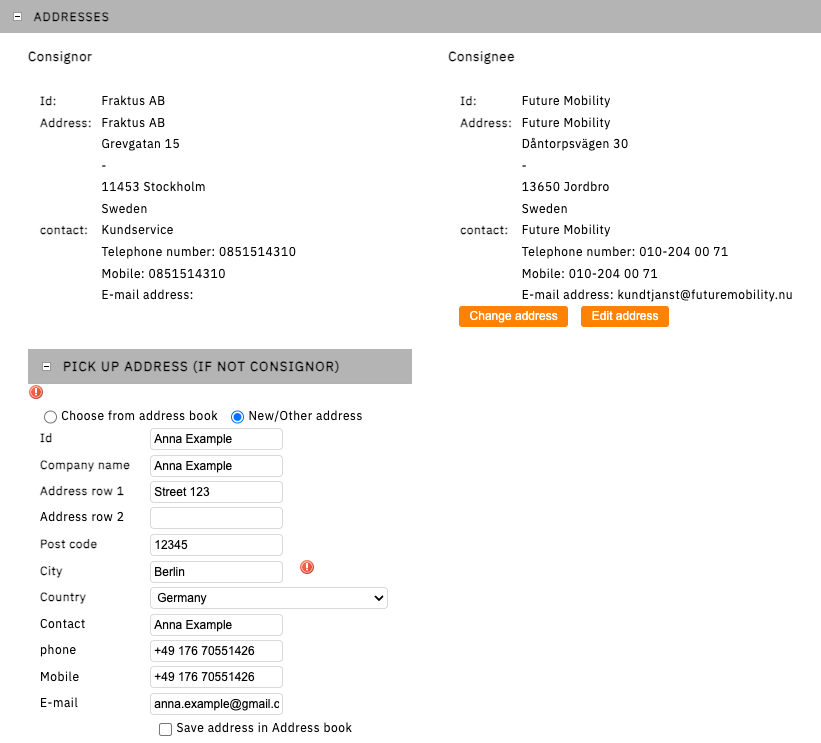
3. Addresses (logged in adressbook)
Sender / Consignor: Fraktus (fixed)
Receiver / Consignee : Choose from adress book: Find Future Mobility, Dåntorpsvägen 30
Pick-up adress: Customer information (There will be no pick up - customer returns to access point)
4. Goods rows
Quantity: Number of packages
Package type: Package UPS 02
Weight, length, width, and height (volume and loading meters not required) See parcel dimensions below ⬇️
Shipping mark: #12345 (order number)
Goods description: e.g. Nufferton pyjamas
5. Customs data
Leave empty if a customs/commercial invoice is not required.
Customs invoice for countries outside the EU: See customs/commercial invoice below ⬇️
6. Transport product
When selecting DHL Service Point (B2C): choose service point manually if the customer requests it
7. Freight payer: Sender (fixed)
8. Other
Leave empty unless you want the package to be picked up by UPS
9. Book and print - send the label to customer!
Dimensions of common parcels:
Small old Sweef boxes: 35 × 25 × 15 cm
Large Sweef boxes: 50 × 50 × 50 cm
New small Sweef boxes – fold lid: 40 × 35 × 17 cm
HFC boxes: 58 × 57 × 57 cm
HFC boxes: 58 × 58 × 37 cm
USE UPS - Cheaper than DHL - but if needed:
DHL Home Delivery Domestic: Sweden, home delivery
DHL Service Point (B2C): Sweden, pickup at service point
DHL Service Point Return: Returns within Sweden, customer drops off at service point (Sender: customer)
Customs / Commercial invoice:
- Upload to fraktus (Attachment)
- Attach 3 invoices (2 tear-off copies lightly taped + 1 in a plastic pouch available at ÖL)
- If the product exists as a product on a BC order: print a pro forma invoice and attach it to the parcel. Must include HS code + weight + billing party
- If it is a non-stocked product, e.g. furniture oil: fill in the commercial invoice manually (also available in Dropbox)
- HS codes can be found at Taricsupport.com (or search on Google, e.g. “wood screw + HS code”)
Cancel shipment: Email the shipment number to kundservice@fraktus.se
⭐️ Shipment status: We can only see orders in Fraktus that are shipped from the showroom. If something is shipped from Future, we need to check with Sebastian G on Slack.