
CANCEL ORDER + UNDER CHANGE
Uppdaterad
CUSTOMER WANTS TO CANCEL ORDER:
1. ORDER STATUS: ORDER in BC (Not ordered yet) - also concerns Stock items like premade
- KS: Cancel the payment connection (Klarna/Kustom: Actions > PSP connect > Cancel order)
- KS: Kundo: Comment "Cancelled" / "Makulerad" - Don't erase the email
- KS: ERASE BC-ORDER (This will change the status in Chrystalize Pipeline to Cancelled)
2. ORDER STATUS: ORDER SENT / CONFIRMED:
- KS: BC: Cancel the payment connection (Klarna/Kustom: Actions > PSP connect > Cancel order)
- KS: BC: ORDER STATUS: UNDER CHANGE (OPS will check with the factory if it is possible to stop the production or if we need to receive it and sell on Leveransklart)
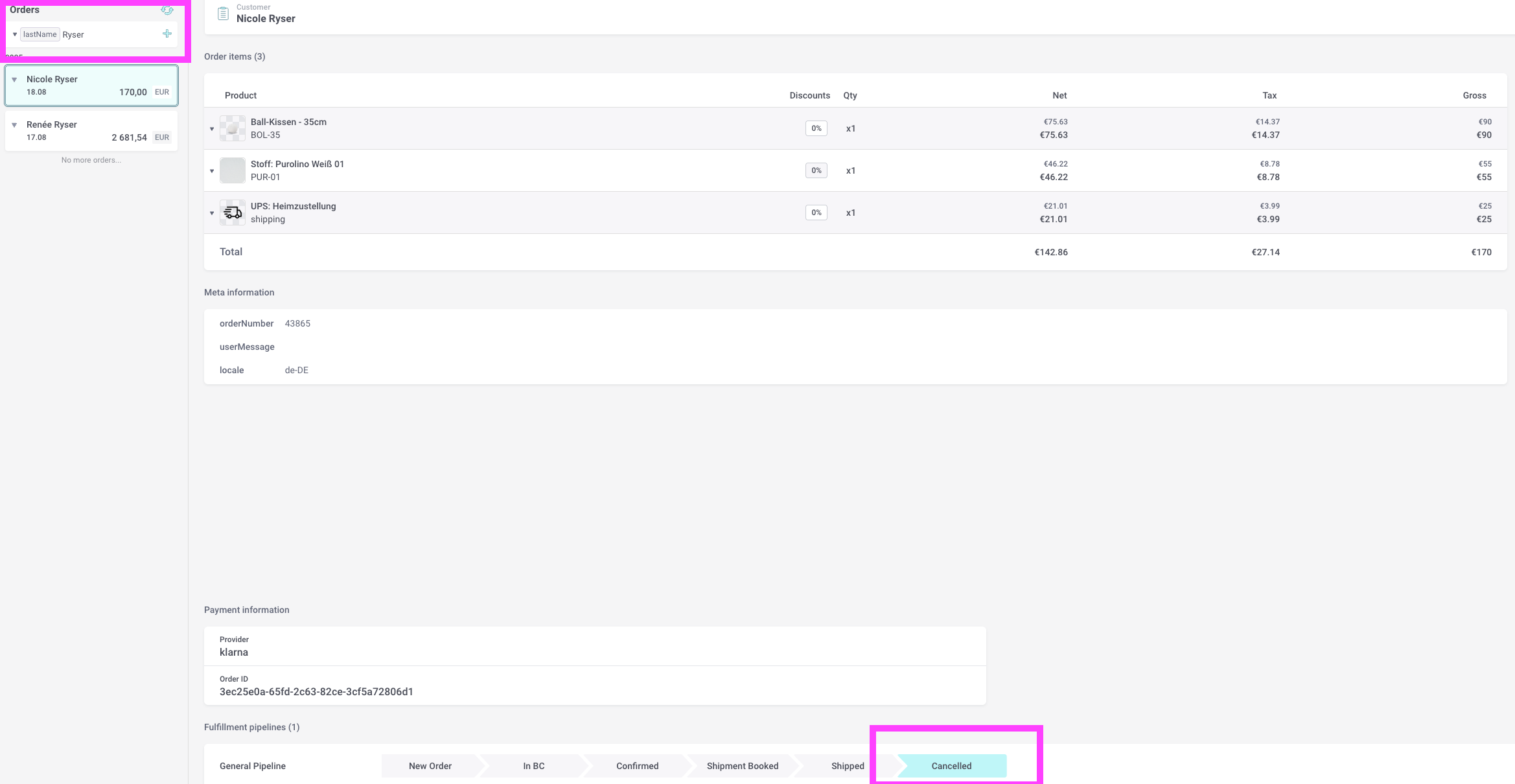
- KS: Chrystalize: Pipeline > Cancelled (see pictures below)
- KS: Kundo: Comment "Cancelled" / "Makulerad" - Don't erase the email
- KS: BC: Comment in notes what you have done Ex. Customer has cancelled order. Cancelled in Klarna/Kustom and Chrystalize // Sofie
- KS: Erase any stock-items on BC-order (This will release the products back to stock and make them available for purchase on website)
- OPS: If we can't stop the order; put the product in Special Items.
- OPS: If IKO is already sent to Ongoing > Press Send Cancel to Warehouse
- OPS: Erase BC-order
3. COMISSION ORDER ALREADY ARRIVED AT FUTURE:
- KS: Let Future know in sweef-future slack that the order is cancelled and not to be shipped. Write ❌ CANCELLED ORDER in ongoing description.

- KS: Cancel the payment connection (Klarna/Kustom: Actions > PSP connect > Cancel order) Double check in portal that the order is deleted!
- KS: Put the product in Special Items in Stock (original emballage)
- KS: Kundo: Comment "Cancelled" / "Makulerad" - Don't erase the email
- KS: ERASE BC-ORDER (This will change the status in Chrystalize Pipeline to Cancelled)
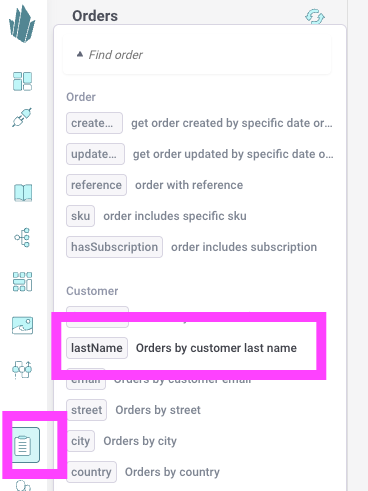
Navigate in Chrystallize:
CUSTOMER WANTS TO CHANGE ORDER:
- KS: Tag the order UNDER CHANGE and write a comment in BC
- KS: Let OPS know about the change in slack operations-customerservice
- OPS: Contact factory and ask for the change (separate OPS guide in drive)
- OPS: Let KS know when the order is changed in factory
- KS: Make the change in the BC-order (PSP connect + adjust) and let the customer know that the change is made and if it will change the delivery time or not.